Our robots.txt said yes. Our host said 429.
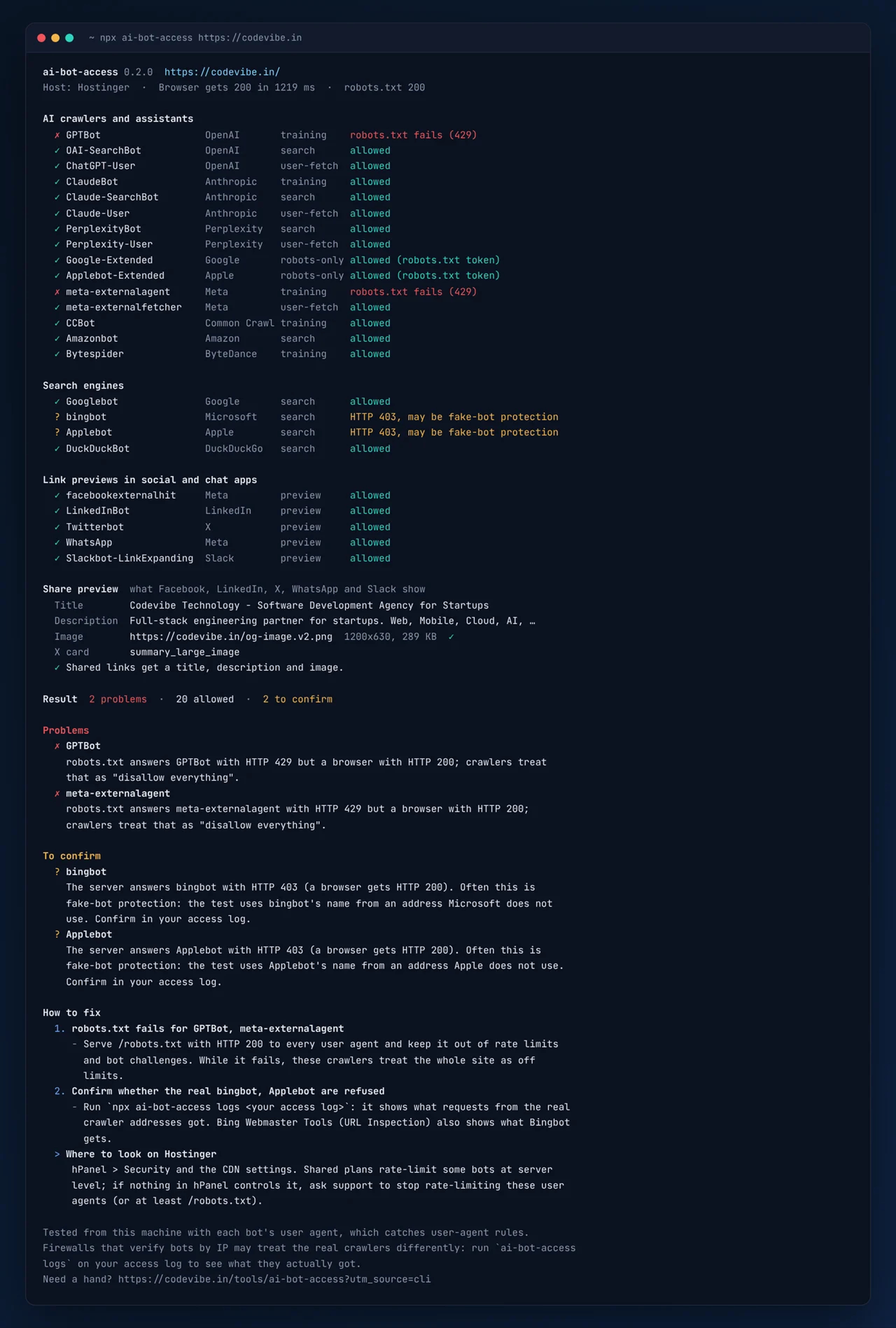
Our robots.txt allowed every AI crawler, so a robots.txt checker would have passed us. But our shared host answered every request that identified as GPTBot with HTTP 429, including the request for robots.txt itself. A crawler that cannot fetch robots.txt treats the whole site as off limits. Nothing told us. The full story.
24 bots, two checks each.
For every bot it fetches your robots.txt with that bot's user agent and applies the rules the way the bot does (RFC 9309). Then it requests your page as the bot and compares the answer with a normal browser: status code, challenge pages, redirects and noindex or noai directives. Both have to pass.
AI crawlers and assistants
Whether ChatGPT, Claude, Perplexity and the rest can read, cite and open your pages.
GPTBot, OAI-SearchBot, ChatGPT-User, ClaudeBot, Claude-SearchBot, Claude-User, PerplexityBot, Perplexity-User, Google-Extended, Applebot-Extended, meta-externalagent, meta-externalfetcher, CCBot, Amazonbot, Bytespider
Search engines
Search results, and the indexes behind Google AI Overviews, Gemini and Copilot.
Googlebot, bingbot, Applebot, DuckDuckBot
Link previews
The title, description and image people see when your link is shared.
facebookexternalhit, LinkedInBot, Twitterbot, WhatsApp, Slackbot
Once per page it also checks your share preview: og:title, og:description and og:image (downloaded, so a broken or oversized image shows up) and twitter:card. Every problem comes with a fix, pointed at the settings of the host or CDN it recognises.
Check, verify, then confirm with your logs.
1. Check a page
Every bot against your robots.txt and your real server, compared with a normal browser. Plus your share preview, and a How to fix list for the host or CDN it detects (Cloudflare, Vercel, Hostinger and 11 more).
$ npx ai-bot-access https://your-site.com2. Verify a bot IP
Is this request really GPTBot, ClaudeBot or Googlebot? Checked against the IP lists the operators publish, with reverse DNS as a fallback.
$ npx ai-bot-access verify 20.171.206.10 --ua "GPTBot/1.4"3. Read your access logs
What the real crawlers got: hits, refusals, real vs fake traffic per bot, top pages, and visitors sent by ChatGPT, Perplexity and other assistants.
$ npx ai-bot-access logs access.logRun it weekly in CI to catch a host or firewall change before it costs you visibility. The README has a ready GitHub Actions workflow, the full option list and examples for using it from code.
AI crawler access FAQs.
Is ChatGPT blocked from my website?
Check the three OpenAI bots separately: GPTBot collects training data, OAI-SearchBot builds ChatGPT search, and ChatGPT-User opens a page when someone asks ChatGPT about it. Run npx ai-bot-access with your URL: it tests all three with their real user agents, against both your robots.txt and your server, and says which ones are locked out and why.
How do I check if GPTBot can crawl my site?
Run npx ai-bot-access https://your-site.com. It fetches your robots.txt with GPTBot's user agent and applies the rules the way GPTBot does, then requests your page as GPTBot and compares the answer with what a normal browser gets. Both have to pass for GPTBot to read the page.
My robots.txt allows GPTBot. Why would it still be blocked?
robots.txt is only a request to crawlers. Your host, CDN or firewall answers first, and many now refuse AI bots by user agent: a 403, a 429 rate limit or a challenge page. If robots.txt itself fails for a bot (a 429 or 5xx), the bot treats your whole site as disallowed. That is what we found on our own site, and why we built the tool.
Should I block AI crawlers?
It depends on the crawler. Blocking training crawlers like GPTBot or CCBot is a fair choice if you do not want your content used for training. Blocking search and user-fetch bots (OAI-SearchBot, ChatGPT-User, Claude-SearchBot, PerplexityBot) keeps you out of AI answers and citations. The point is to decide on purpose, not by accident.
How do I know a request is really from GPTBot or Googlebot?
Check the IP, not the user agent: anyone can send "GPTBot". OpenAI, Anthropic, Perplexity, Google, Microsoft, Apple, DuckDuckGo, Common Crawl and Amazon publish the addresses their crawlers use. npx ai-bot-access verify <ip> checks an address against those lists, and the same check can run in your Next.js middleware or Express app.
Why does my link preview not show on LinkedIn, X or WhatsApp?
Usually one of three things: the page has no og:image (or a relative one), the image itself fails to load, or the preview bot (LinkedInBot, Twitterbot, facebookexternalhit, WhatsApp) is refused by your server. The tool checks all three: it reads your Open Graph tags, downloads the image, and requests the page as each preview bot.
Do I need an account or an API key?
No. It is free and open source (MIT), runs with npx on Node.js 18.17 or newer, and has no dependencies. Nothing is sent to us: the requests go straight from your machine to your site and to the bot operators' published IP lists.
Is it safe to run against my site?
Yes. A full check sends about 50 requests, one at a time with a short pause, which is less than a short browsing session. If your site is sensitive to bursts, raise --delay or check one group at a time with --bots ai, --bots search or --bots social.
Want the bigger picture of how your site shows up in Google and AI answers? See our SEO and AI search services or get a free website audit.
Also from our team.
ai-bot-access is one of our MIT-licensed packages. The other loads your analytics and ad tags without slowing the page, with consent built in.
Load Google Tag Manager, GA4, Meta Pixel and LinkedIn Insight in Next.js after the page is interactive, with Consent Mode v2 and a cookie banner.
Want us to fix it for you?
We fix crawler access, share previews and technical SEO for growing businesses. Tell us your site and we will reply within one business day.