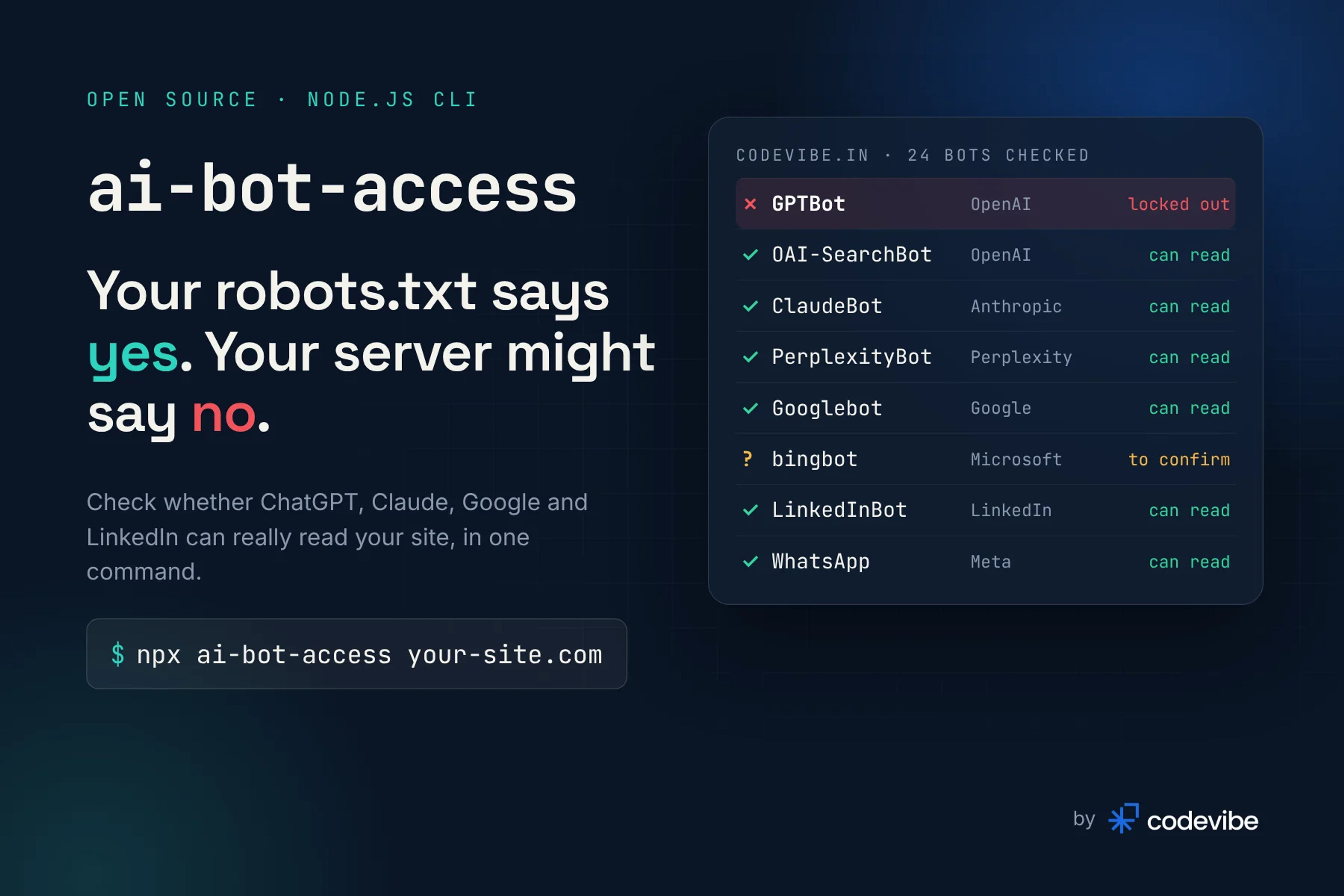
Probably not all of them, and your robots.txt will not tell you which. A robots.txt file only says what crawlers may read. Your host, CDN and firewall decide what they can read, and they answer first. We learned this on our own site in November 2026: robots.txt welcomed every AI crawler, yet OpenAI's GPTBot could not read a single page.
This post covers what we found, why it happens to so many sites, and how to check every bot that matters (AI assistants, search engines and the link-preview bots behind LinkedIn and WhatsApp) with one free command.
Why would AI crawlers be blocked if robots.txt allows them?
Because the block happens before your robots.txt is ever read. Firewalls and hosts increasingly filter bots by their user agent. Cloudflare, which says it protects traffic for about 20% of the web, made blocking AI crawlers the default for new domains on 1 July 2025, and more than one million of its customers had already switched the block on (Cloudflare, 2025). Shared hosts add their own rate limits on top.
Nobody notices, because the site looks fine in a browser. A July 2026 study of 2,096 popular domains found 115 sites whose firewall filtered GPTBot while their robots.txt said nothing at all, and by September the count had grown to 178 (HasData, 2026).
The failure modes look like this:
- 403 Forbidden for the bot's user agent, from a WAF or host rule
- 429 Too Many Requests on the very first request, a rate limit keyed on the user agent rather than on traffic
- A challenge page ("verify you are human") that a crawler cannot solve
- A failing robots.txt. This one hurts most, because a crawler that cannot fetch robots.txt treats the whole site as disallowed. RFC 9309 asks crawlers to assume complete disallow when robots.txt is unreachable through a server error (RFC 9309), and Google treats a 429 as a server error (Google Search Central)
What did we find on codevibe.in?
Our host answered every request that identified as GPTBot with HTTP 429, including the request for robots.txt. Every request we sent as GPTBot got a 429, while the same requests with a browser's user agent got 200. Meta's training crawler, meta-externalagent, got the same 429. Our robots.txt allowed both by name, so a robots.txt checker would have told us we were fine.
This is the run against our home page with the tool we built afterwards:
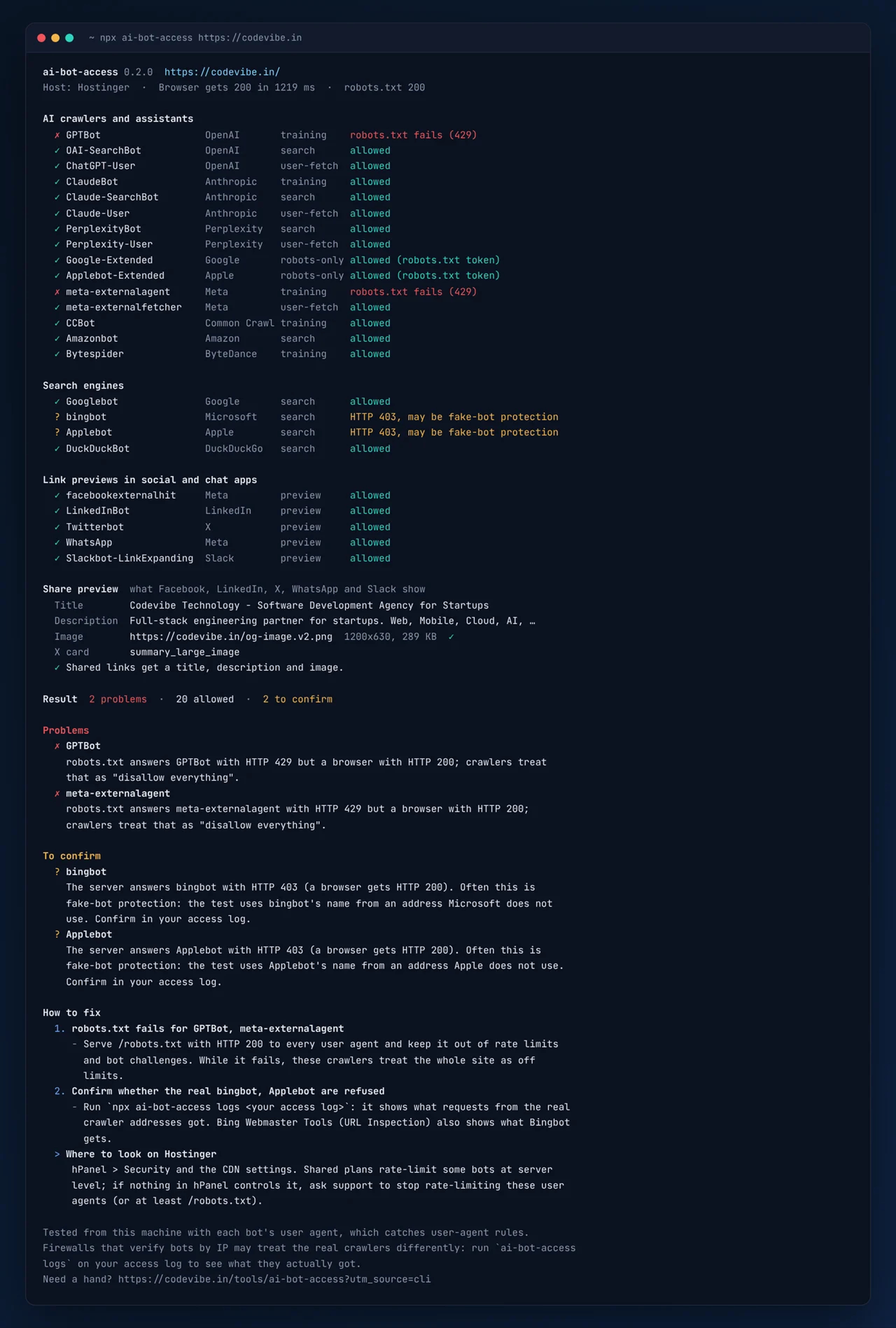
Two more things showed up when we added search engines. Bingbot and Applebot got a 403. That is not automatically bad news: many firewalls refuse requests that use a search crawler's name from an address the crawler does not use, which is exactly what a test from an office laptop does. So the tool marks those as "to confirm" and we are checking our access log before we call it a problem.
The good news was on the sharing side. LinkedIn, X, WhatsApp, Facebook and Slack could all read the page, and our share image (1200x630, 289 KB) loaded for every one of them.
Which bots should be able to read your site?
It depends on the job each bot does, so decide per bot rather than "AI yes or no". Blocking a training crawler keeps your text out of future models. Blocking a search or preview bot costs you visibility today.
| Job | Bots | If they are blocked |
|---|---|---|
| AI training | GPTBot, ClaudeBot, meta-externalagent, CCBot, Bytespider | Your content is not used to train future models. A fair choice. |
| AI search | OAI-SearchBot, Claude-SearchBot, PerplexityBot, Amazonbot | You are less likely to be cited in AI answers |
| AI user fetch | ChatGPT-User, Claude-User, Perplexity-User, meta-externalfetcher | The assistant cannot open your page when someone asks about it |
| Search engines | Googlebot, bingbot, Applebot, DuckDuckBot | You drop out of search, and out of the indexes behind AI Overviews, Gemini and Copilot |
| Link previews | facebookexternalhit, LinkedInBot, Twitterbot, WhatsApp, Slackbot | Shared links show a bare URL with no title or image |
On codevibe.in we keep every one of these open. Your answer can differ. What matters is that it is a choice and not an accident of your hosting plan.
How do you check every bot in one command?
Run npx ai-bot-access with your URL. It needs Node.js 18.17 or newer and no account or API key:
npx ai-bot-access https://your-site.com
For each of 24 bots it does two things:
- Fetches your robots.txt with that bot's user agent and applies the rules the way the bot does (its own group first, then
*, longest matching rule wins). - Requests your page as the bot and compares the answer with what a normal browser gets: status code, challenge pages, redirects, and
noindexornoaidirectives.
Then it checks your share preview (og:title, og:description, og:image and twitter:card, with the image downloaded so a broken or oversized one shows up) and ends with a How to fix list. It recognises 14 hosts and CDNs from the response headers, so on Cloudflare it points at the bot settings in the dashboard and on Hostinger at hPanel and support.
A full check sends about 50 requests, one at a time with a short pause between them, so it stays gentle on your server. To run one group, add --bots ai, --bots search or --bots social.
How do you know a request was really GPTBot?
Check the IP address, because the user agent proves nothing. Scrapers borrow crawler names all the time. OpenAI publishes the address ranges for GPTBot, OAI-SearchBot and ChatGPT-User (OpenAI), and Anthropic, Perplexity, Google, Microsoft, Apple, DuckDuckGo, Common Crawl and Amazon do the same.
npx ai-bot-access verify 20.171.206.10 --ua "GPTBot/1.4"
# ✓ verified  20.171.206.10 is in OpenAI's published GPTBot range 20.171.206.0/24.
The same check can run inside a Next.js middleware or an Express app to refuse impostors while letting the real crawlers through. Meta, LinkedIn, X, Slack and ByteDance publish no lists, so their traffic can only be reported as unverifiable.
The most reliable picture comes from your own access log, because it shows what the real crawlers got:
npx ai-bot-access logs /var/log/nginx/access.log
It counts hits, refusals and real versus fake requests per bot, lists the pages each one asked for, and counts visitors sent by ChatGPT, Perplexity and other assistants. This is how you settle a "to confirm" result like our Bingbot 403.
How do you fix a hidden block?
Make robots.txt answer 200 to everyone, then exempt the bots you want from your host's or CDN's bot rules. In order:
- robots.txt first. It must return 200 to every user agent and sit outside rate limits and challenges. While it fails, nothing else you do matters to that crawler.
- Find the rule. On Cloudflare, look at the bot settings, AI crawler controls and WAF custom rules. On shared hosting, check the security panel, and if nothing there controls it, ask support. We are doing exactly that with ours.
- Allow verified bots, not user agents. Most firewalls can allow "verified bots", which checks the IP for you. Allowing a user agent string also lets in everyone who copies it.
- Watch it. Hosting and firewall settings change without notice. A weekly run of
npx ai-bot-accessin CI fails the build when a hidden block appears.
The tool is free and open source under the MIT licence: codevibe.in/tools/ai-bot-access has the details, and the code is on GitHub. If you would rather we look at your site, our SEO and AI search team fixes crawler access, share previews and the rest of technical SEO, or start with a free website audit.