Tag Manager was 4.2 of our 4.7 seconds of blocking time.
In November 2026 we ran Lighthouse on our own homepage. Tag Manager, with GA4 and Google Ads inside it, loaded 470 KiB of script during page load and caused 4.2 seconds of the 4.7 seconds of Total Blocking Time on mobile. Moving the tags behind the first interaction took third-party blocking from 4,335 ms to 0 ms, with every tag still on the site. Together with the other fixes in our speed case study, mobile PageSpeed went from 54 to 99.
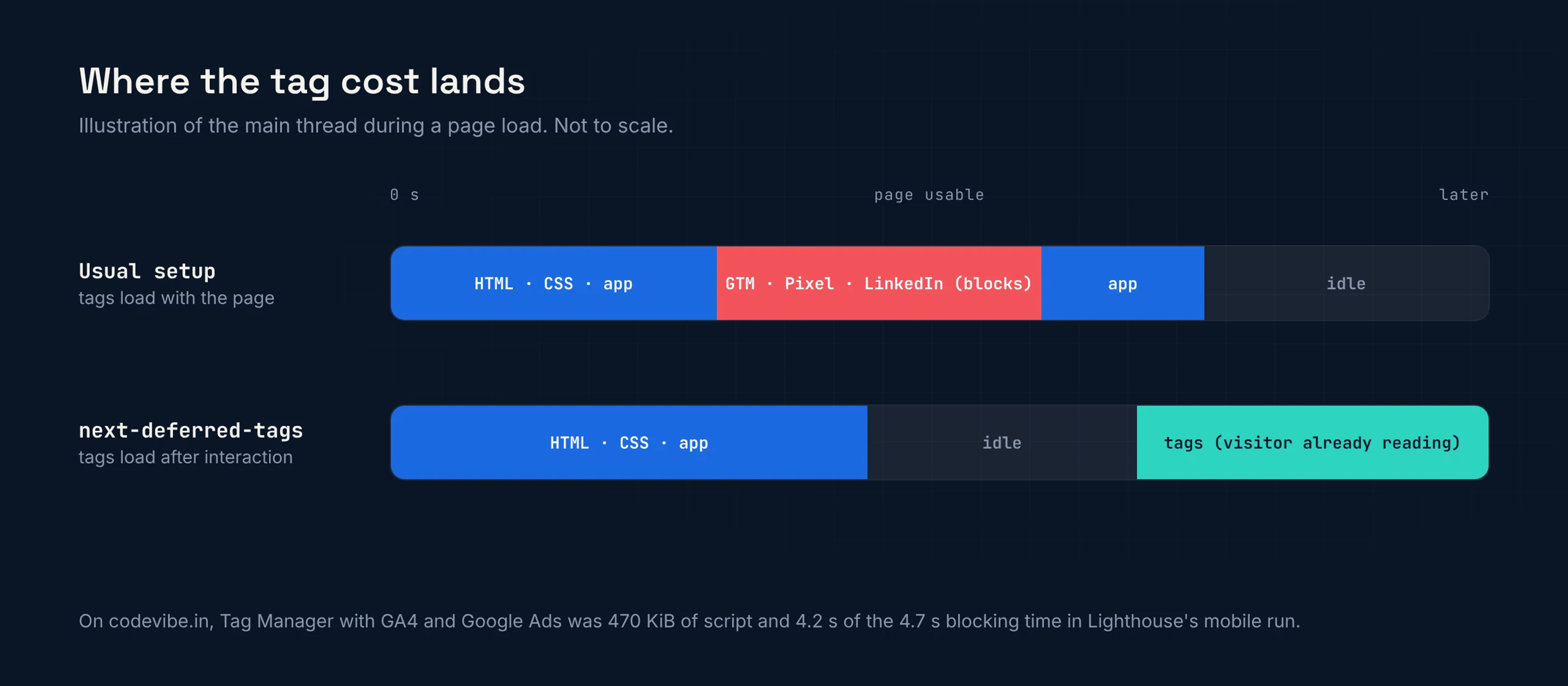
One line in your root layout.
// app/layout.tsx
import { DeferredTags } from 'next-deferred-tags';

export default function RootLayout({ children }) {
  return (
    <html lang="en">
      <body>
        {children}
        <DeferredTags gtm="GTM-XXXXXXX" />
      </body>
    </html>
  );
}
Tag Manager now loads on the visitor's first scroll, tap or key press, or 5 seconds after the page has loaded, whichever comes first.
Add ga4, metaPixel or linkedin for tags that do not run through GTM, and consent="stored" with <ConsentBanner /> to ask for consent first.
The README covers events, the banner, every prop and a tested example app.
Faster pages, same data.
Nothing during page load
No tag script in the server HTML and no tag requests until the visitor interacts or 5 seconds pass after load.
No lost data
The same queues the official snippets create exist from the first render, so early page views and events are replayed in order.
Consent Mode v2 and a banner
Google signals denied until the visitor agrees, Meta and LinkedIn held back until marketing consent, and an accessible banner you can log choices from.
Page views on navigation
Every client-side route change pushes a page view, de-duplicated for React Strict Mode.
Several vendors, one trigger
GTM, GA4, Meta Pixel, LinkedIn Insight and any extra scripts load together, once.
AI referrals counted
Visits sent by ChatGPT, Perplexity, Claude, Gemini or Copilot get an ai_referral event you can report on in GA4.
Four ways to add tags to Next.js.
| Approach | When the tags run | App Router | Consent |
|---|---|---|---|
| Standard GTM snippet in <head> | During page load | Yes | Your own setup |
| @next/third-parties | Right after hydration | Yes | Your own setup |
| next/script strategy="worker" (Partytown) | In a web worker | No (Pages Router only, experimental) | Your own setup |
| next-deferred-tags | First interaction, or 5 s after load | Yes | Built in |
The trade-off: a visitor who opens a page and leaves within 5 seconds without touching it is not counted. For most marketing sites that is a small slice of bounces. If every hit matters, lower the delay or also send key conversions server-side.
Tag Manager and Next.js FAQs.
Does Google Tag Manager slow down a Next.js site?
It can, by a lot. With the usual snippet or @next/third-parties, Tag Manager and every tag inside it download and run while the page is still loading, which is when PageSpeed measures blocking time. On codevibe.in, Tag Manager with GA4 and Google Ads was 470 KiB of script and caused 4.2 of the 4.7 seconds of Total Blocking Time on mobile.
How do I load Google Tag Manager after the page loads in Next.js?
Install next-deferred-tags and add <DeferredTags gtm="GTM-XXXXXXX" /> to your root layout. Tag Manager then loads on the visitor's first scroll, tap or key press, or 5 seconds after the page has loaded, whichever comes first. Page views and events pushed before then wait in the dataLayer and are replayed in order.
Will I lose page views or conversions?
Not for anyone who stays: the dataLayer, gtag, fbq and lintrk queues exist from the first render, so early page views and events are kept and sent when the tags load. A visitor who leaves within the delay without touching the page is not counted. If every hit matters, lower the delay or also send key conversions server-side.
How is this different from @next/third-parties?
@next/third-parties is the official way to add GTM and GA4 to Next.js. It loads them right after hydration, so their cost still lands in the load window PageSpeed measures. next-deferred-tags waits for an interaction or a delay, handles GTM, GA4, Meta Pixel and LinkedIn in one component, and adds cookie consent. If the tags' cost does not matter for your site, @next/third-parties is the simpler choice.
Does it support Google Consent Mode v2?
Yes. With consent handling on, analytics_storage, ad_storage, ad_user_data and ad_personalization are set to denied before Tag Manager or gtag.js loads and updated the moment the visitor chooses. Meta Pixel and LinkedIn wait for marketing consent. An optional cookie banner is included, or you can keep your own.
Is this just gaming Lighthouse?
Lighthouse does score better partly because it never scrolls. The benefit for real visitors is that the main thread is free while the page renders, so taps respond and content appears sooner, and the tags run once the visitor is already reading.
Does it work with the App Router and static pages?
Yes. It is built and tested for the App Router on Next.js 13.4 and newer, and keeps static pages static. The Pages Router should work through next/navigation but is not tested yet.
Want a faster site without losing your tracking? See our web development and SEO services, or get a free website audit.
Also from our team.
Check whether AI crawlers, search engines and link-preview bots can read your site, verify bot IPs and read your access logs.
Want a faster site without losing data?
We speed up Next.js and React sites while keeping every tag your marketing team relies on. Tell us your site and we will reply within one business day.